Changelog

Follow new updates and improvements to LiveSession.

Introducing the Events 🎉
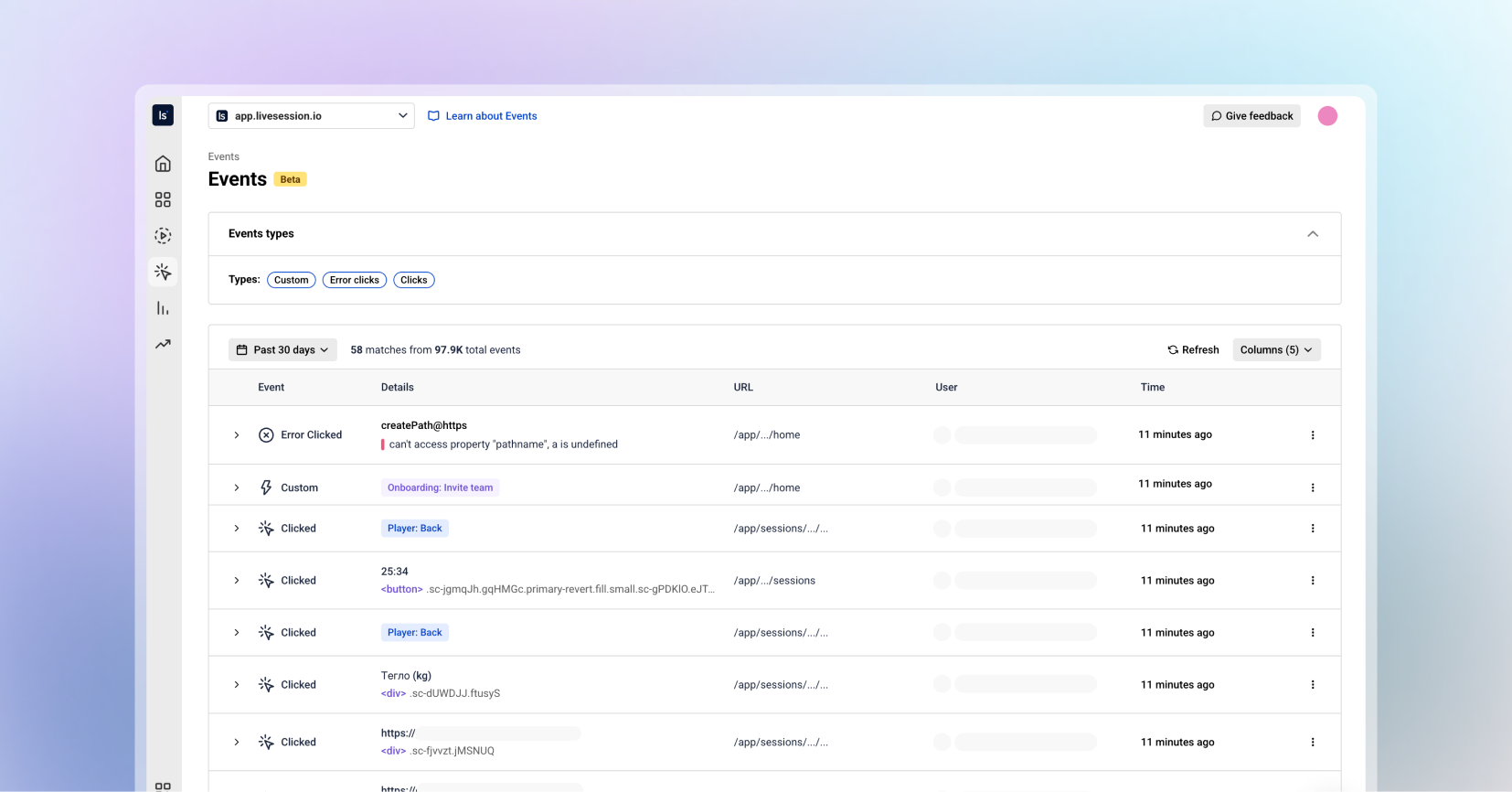
Hey LiveSession users! We’re thrilled to unveil one of our biggest updates yet. Events bring powerful behavioral insights directly into your workflow. This release gives you deeper visibility into what users do across your product, helping you move from “what happened?” to “why?” faster than ever.

Let’s dive into what’s new:


🎮 Events: Your New Command Center for User Actions 

For the first time in LiveSession, you can browse all user events in one organized, searchable, and beautifully structured place.

The Events tab lets you:

  • Explore all events happening inside your product, in real time

  • Filter by event type (custom events, clicks, defined events, error clicks, and more)

  • See every event property in a clean, readable structure

  • Understand user journeys through actions - not just sessions

  • Investigate issues faster than ever before

This is your new home for deep product insights, onboarding audits, feature adoption checks, and user behavior exploration.


📒 New Event List

The Event List is built for clarity and speed.
Each event displays:

  • Event name

  • Event type

  • User

  • Time (when this event occurred)

Everything you need to understand what happened and why, without digging.

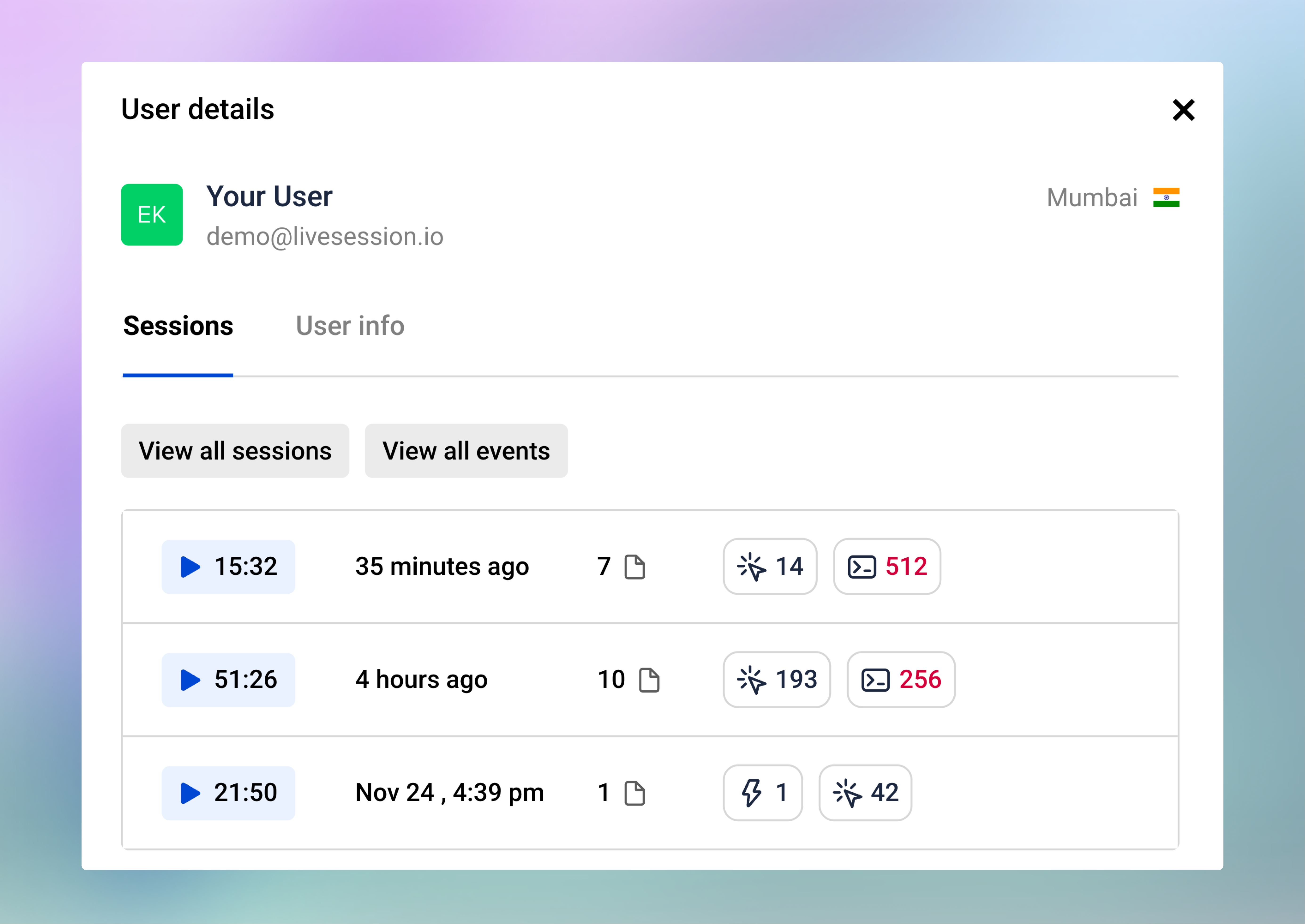
👨🏼‍💻 User Profiles

User Profiles make it simple to understand and analyze individual user behavior. From any profile, you can see:

  • A list of all recent user sessions

  • Session statistics: total sessions, total duration, and average session length

  • User information including built-in properties (email, location) and custom properties (plan, website)

You can also click View All Sessions or View All Events. This takes you directly to the respective list with a filter applied for that user’s ID, so you can see all sessions or events performed by this specific user. 

📈 Event Insights
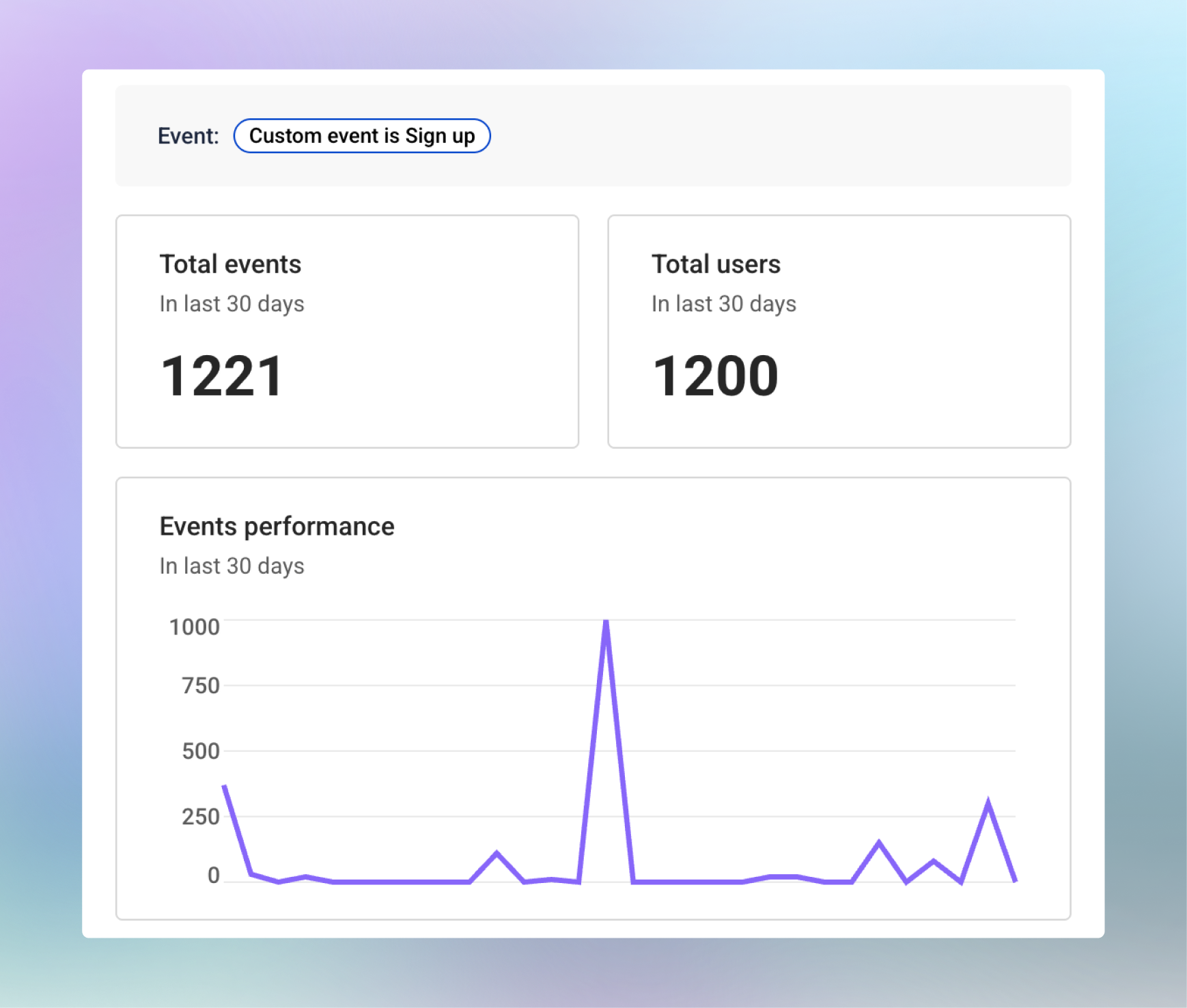
The Event Insights provides a breakdown for each specific event. In the side panel, you can see:

  • Total number of times the event was performed in the last 30 days

  • Total users who triggered the event

  • A trend chart showing changes in event usage over time

  • The last few sessions where this event occurred

These insights help you track feature adoption, understand user behavior, and quickly identify patterns or anomalies that need attention.

🕵🏻‍♂️ Viewing Event Details

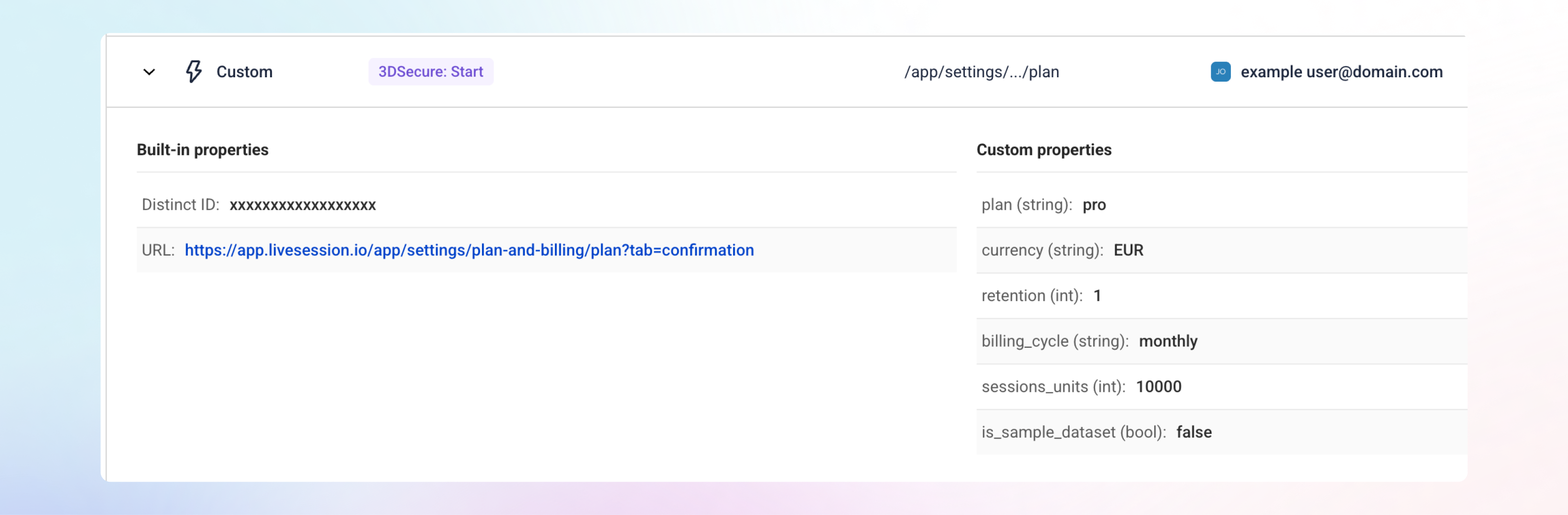
To see more about any event, click the row or the arrow next to it, and the details will open right below. This inline view makes it easy to get full context without leaving the Event List.

Every event includes built-in properties such as the Distinct ID and the URL where the event occurred.

There are 3 event types with a special look:

Custom Events show all the properties sent with the event, giving you complete visibility into user interactions.

Error Clicks include extra technical details, like the error message and stack trace, making it easier to debug issues without replaying multiple sessions.

Defined Events include the same click-related properties as regular clicks, giving you consistent context across event types.

Smart URL Trimming

Dynamic IDs are now automatically trimmed from URLs, giving you URLs that are actually readable.

🥰 Why You’ll Love It

Deeper Understanding of User Behavior

Events give you the “micro-level” view at user actions in real time.

Faster Product Insights

Move from events → session replay in seconds.

A Foundation for Future Power Features

The Events unlock space for even more advanced analytics coming soon.


We’re incredibly excited to bring this update to you.
Jump into the new Events, and let us know what you think.

Request new features here: https://feedback.livesession.io/
New Feature

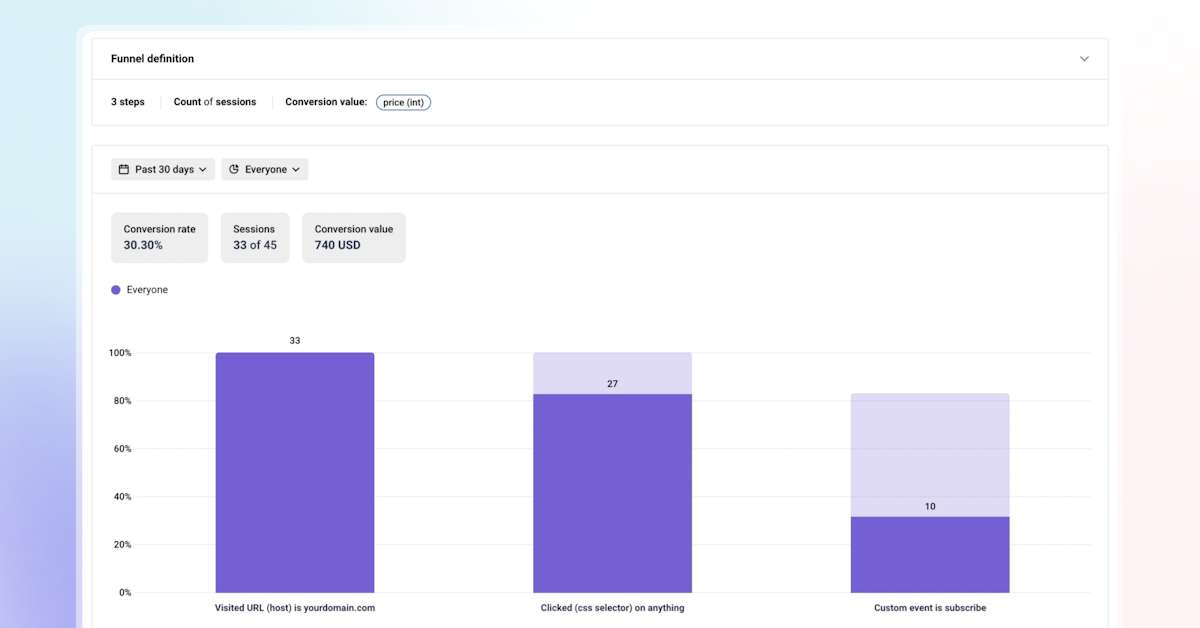
Calculate Conversion Values in the Funnels

We're excited to bring you enhancements to our Funnels feature that give you deeper insights into your user journey and conversion metrics.

1. Conversion Rate, Right Up Front

You can now see the overall conversion rate for your entire funnel directly in the display container, making it easier to quickly assess funnel performance.

Try This: Set up an onboarding funnel and see if you can spot any drop-off points in a single glance.

2. See the Revenue Your Funnels Bring In

Want to know the actual dollar value of your funnel conversions? If your last funnel step has a number property (like order value or subscription price), you can now see the total revenue from things like new signups or completed purchases. It’s like putting a price tag on your funnel’s success!

Try This: Build an eCommerce checkout funnel and check out the total revenue from completed orders.

3. Track Users or Sessions—Your Choice

We’ve added some flexibility so you can track what matters most to you. Want to see how many individual users complete a step, like onboarding? Go with unique users. Or maybe you’re curious about repeat actions, like how often folks interact with your cart? Choose sessions instead. It’s all about getting the insights you need.

Try This: Test a SaaS activation funnel with unique users, then switch to sessions to see how many times the activation actions happened.
Which option’s your go-to? We’re curious to hear how you’re using this!

4. Filter Like a Pro
Our LiveSession filters are now part of Funnels, so you can zoom in on specific users or sessions by things like location, device, or behavior. Want to focus on users from a certain campaign? You’re in control, and it’s super easy to get those razor-sharp insights.

Try This: Filter your funnel to only include users from a recent marketing campaign and see how it’s performing.

Why These Changes Matter

These enhancements make it easier than ever to understand your users, optimize conversions, and drive revenue. Whether you’re a SaaS team aiming to increase trial-to-paid conversions or an eCommerce business streamlining checkout flows, our updated Funnels feature gives you the tools to succeed.

Get Started Today

Log in to your LiveSession account to explore these new features, or check out our help center for setup guides and best practices. Not a user yet? Start a free trial to see how LiveSession can transform your analytics.

Have questions or feedback? Reach out to our team at support@livesession.io or book a personalized demo to see these features in action.

Happy analyzing,

The LiveSession Team

New Feature

🚀 LiveSession Demo Project!

We’re excited to roll out a new way for you to explore and interact with LiveSession—the Demo Project! Whether you’re new to the platform or a seasoned pro, you can now access LiveSession with realistic sample data to dive into all our features.

🔍 How does it work?
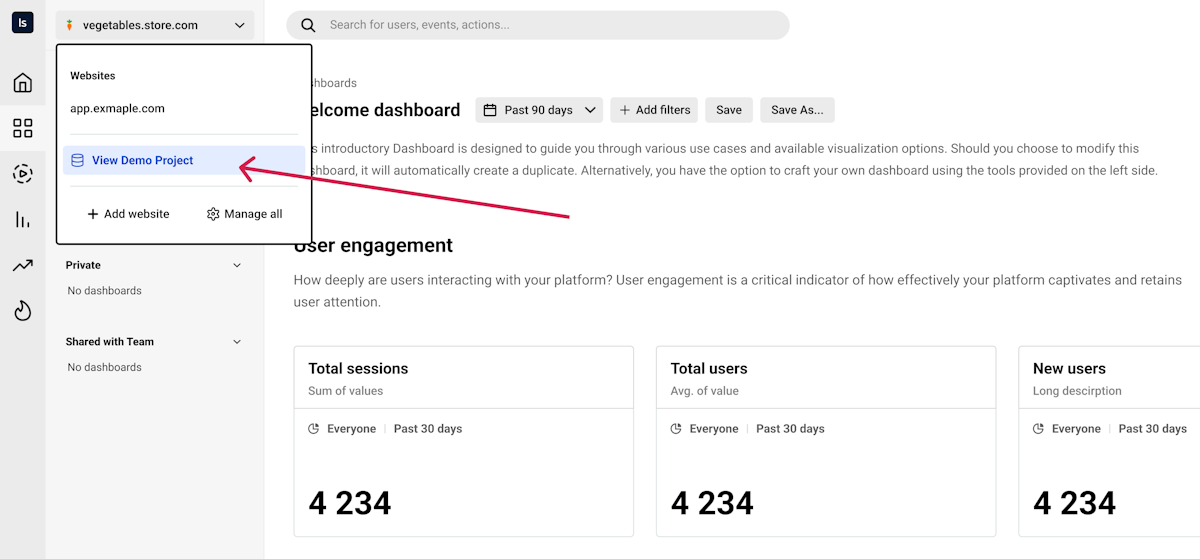
You’ll find the "View demo project" button in three places:

  • In the websites/projects dropdown,

  • In your profile dropdown,

  • Or directly from the Home tab.

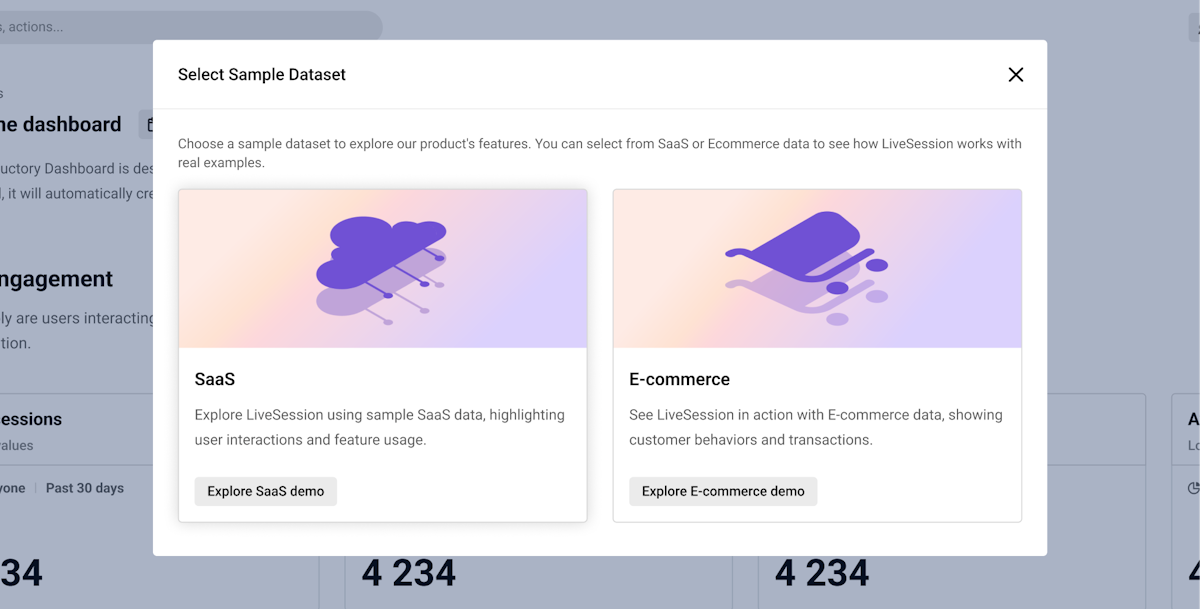
Once you click it, you can choose between SaaS or Ecommerce datasets (with more options coming soon!). Each dataset is fully equipped with everything you need to explore:

  • Dashboards

  • Metrics

  • Funnels

  • Segments

  • Custom events

  • Sessions

💡 Why should you try it?

  • Hands-on learning: Get a real feel for how LiveSession works without needing to set up tracking or use your own data.

  • Explore key features: Walk through dashboards, analyze metrics, and try out funnels—all on real-world data examples.

  • Experiment freely: Test out new ideas, practice segmenting data, and discover insights without impacting your own projects.

👥 Who is it for?

  • New users: Fast-track your learning and get to know the platform right away.

  • Existing users: Try advanced features with real scenarios to enhance your workflow.

Ready to dive in? Head to the dropdown and click "View demo project" to get started with SaaS or Ecommerce data now!

Earlier updates