November 28th, 2025
New Feature

Hey LiveSession users! We’re thrilled to unveil one of our biggest updates yet. Events bring powerful behavioral insights directly into your workflow. This release gives you deeper visibility into what users do across your product, helping you move from “what happened?” to “why?” faster than ever.
Let’s dive into what’s new:
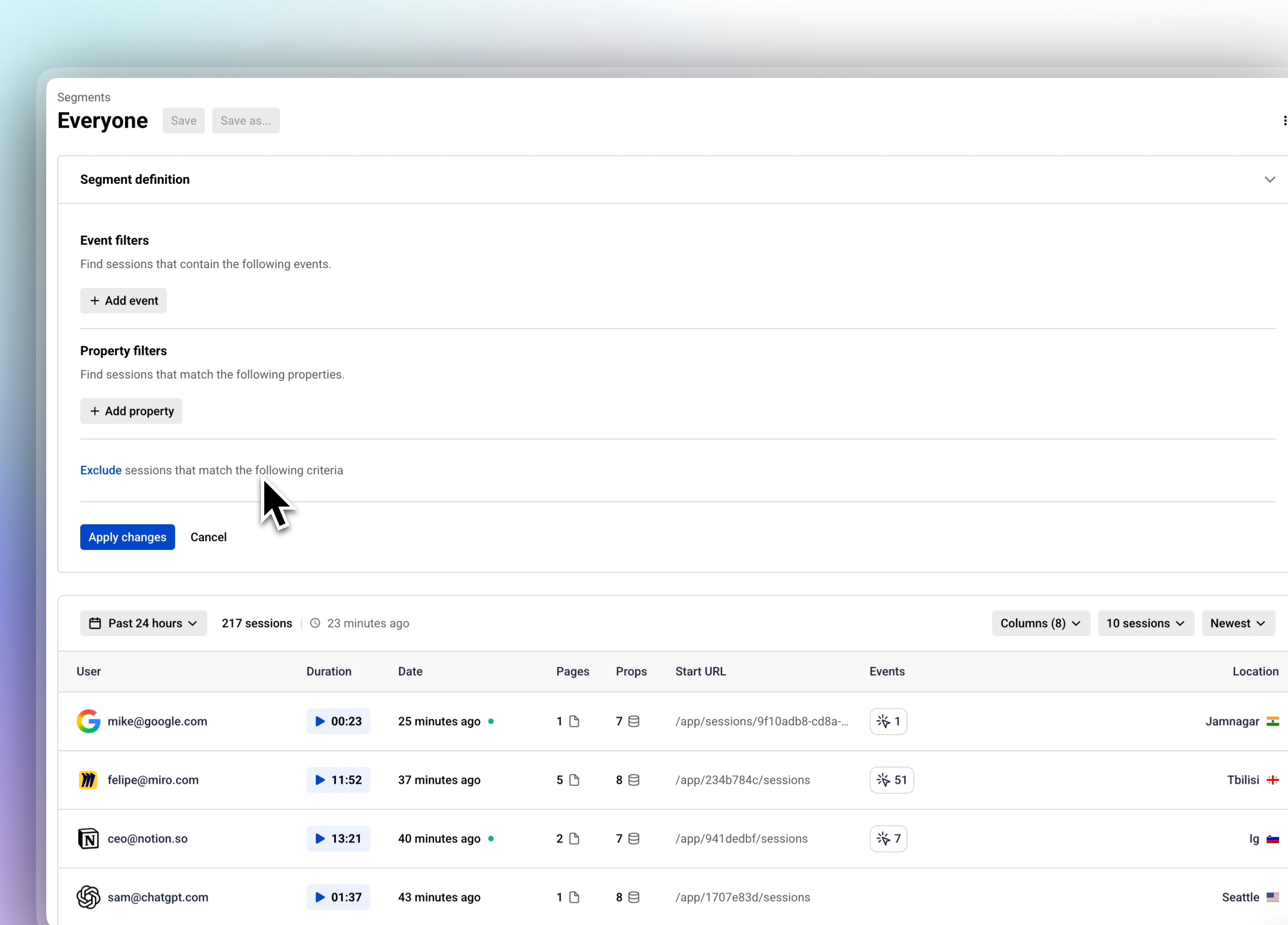
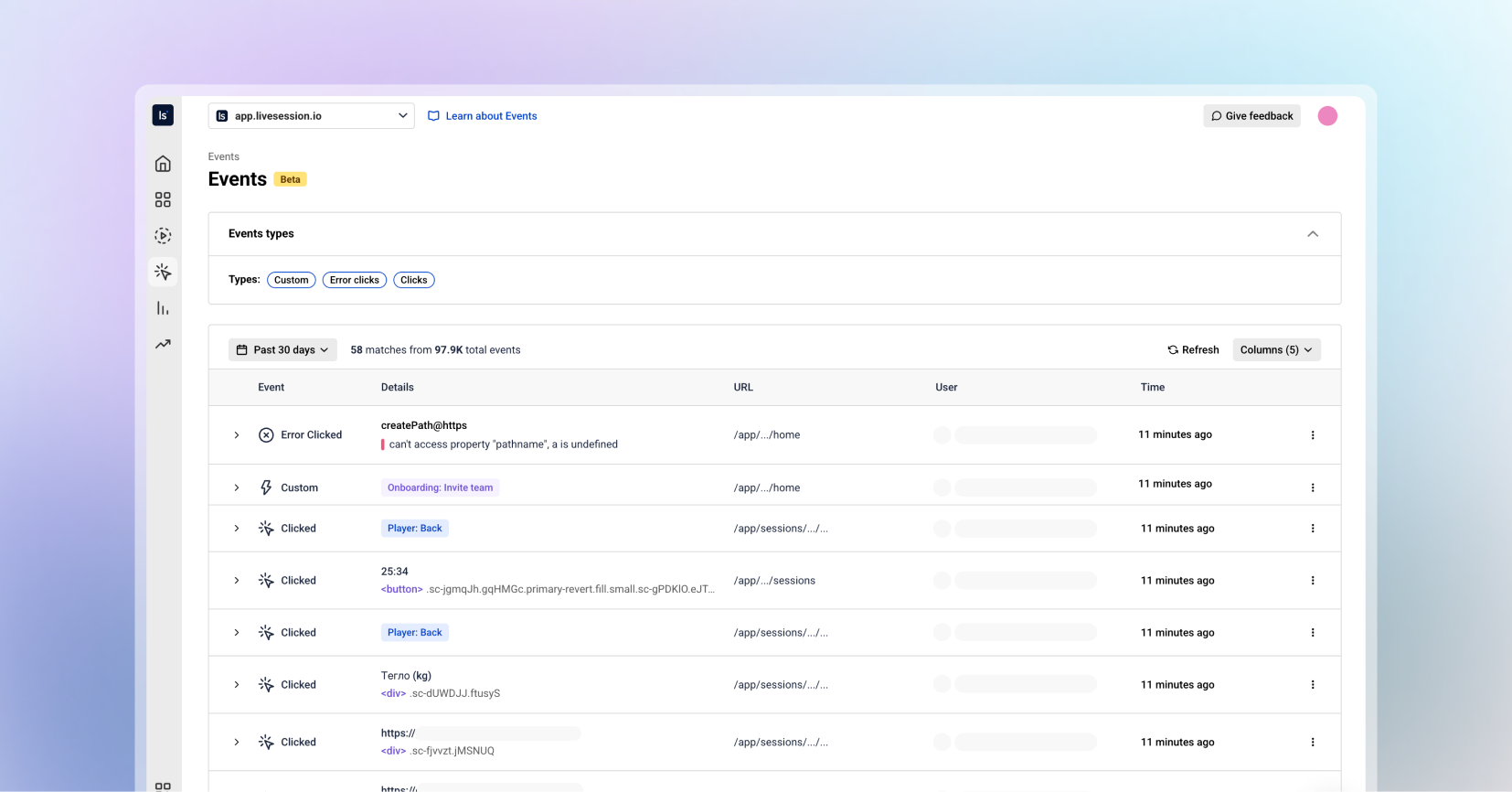
For the first time in LiveSession, you can browse all user events in one organized, searchable, and beautifully structured place.
The Events tab lets you:
Explore all events happening inside your product, in real time
Filter by event type (custom events, clicks, defined events, error clicks, and more)
See every event property in a clean, readable structure
Understand user journeys through actions - not just sessions
Investigate issues faster than ever before
This is your new home for deep product insights, onboarding audits, feature adoption checks, and user behavior exploration.
The Event List is built for clarity and speed.
Each event displays:
Event name
Event type
User
Time (when this event occurred)
Everything you need to understand what happened and why, without digging.

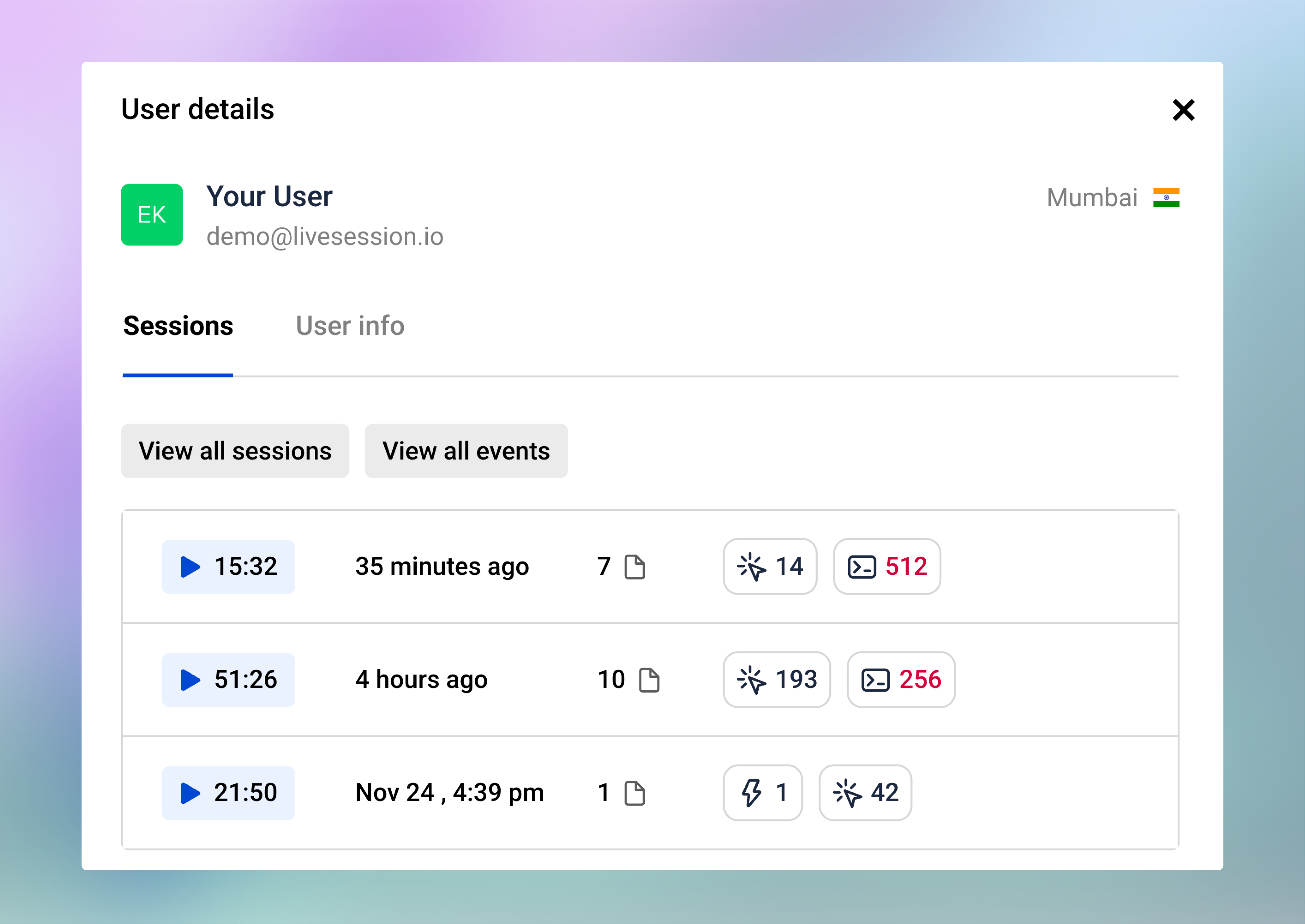
User Profiles make it simple to understand and analyze individual user behavior. From any profile, you can see:
A list of all recent user sessions
Session statistics: total sessions, total duration, and average session length
User information including built-in properties (email, location) and custom properties (plan, website)
You can also click View All Sessions or View All Events. This takes you directly to the respective list with a filter applied for that user’s ID, so you can see all sessions or events performed by this specific user.

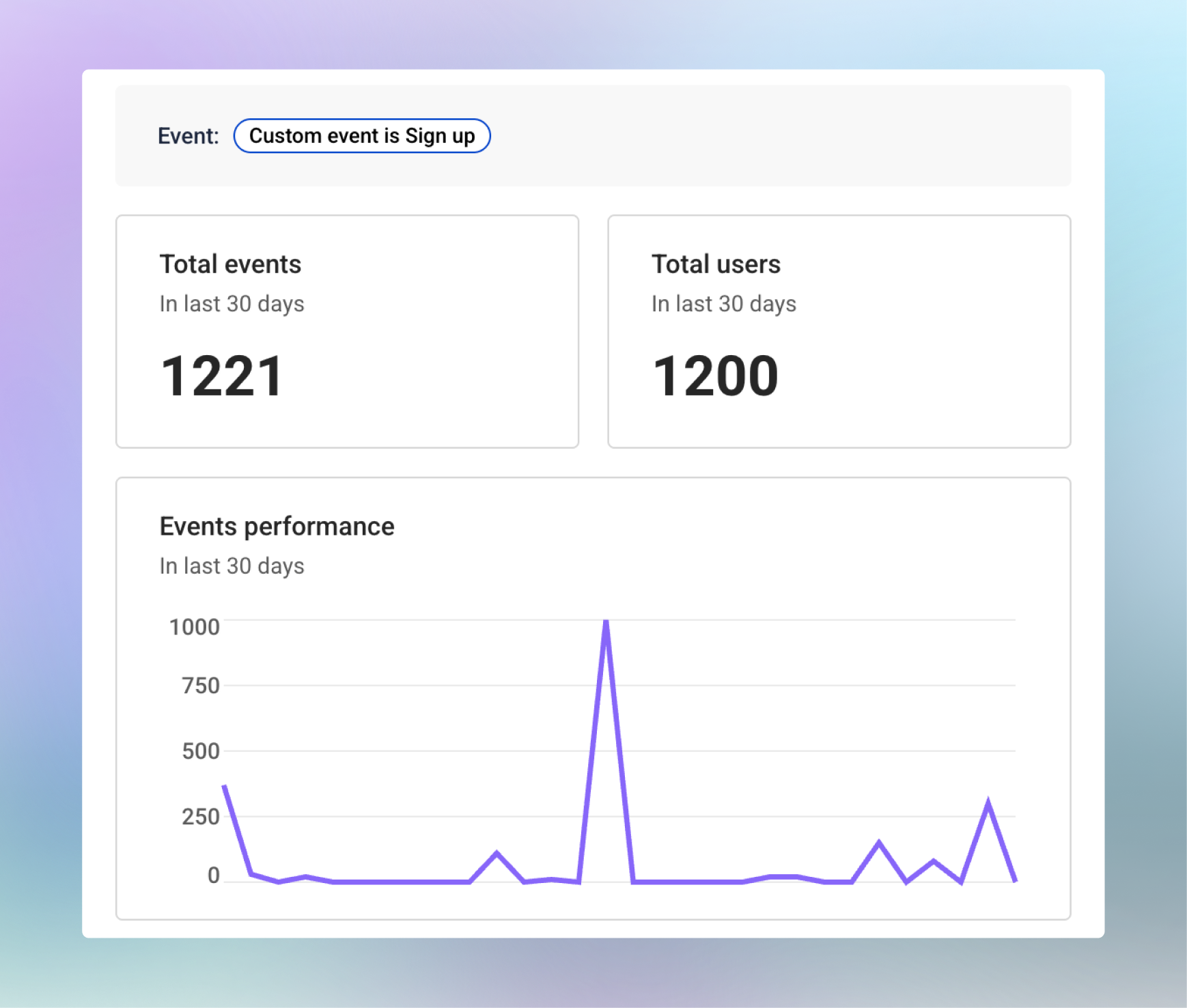
The Event Insights provides a breakdown for each specific event. In the side panel, you can see:
Total number of times the event was performed in the last 30 days
Total users who triggered the event
A trend chart showing changes in event usage over time
The last few sessions where this event occurred
These insights help you track feature adoption, understand user behavior, and quickly identify patterns or anomalies that need attention.

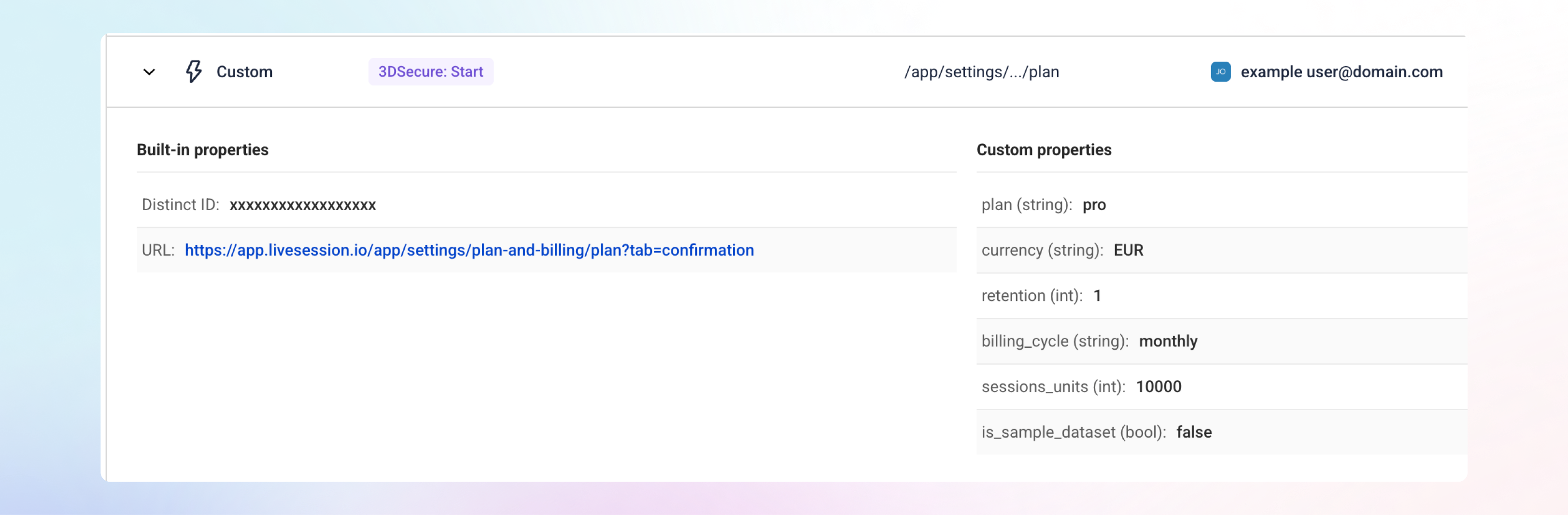
To see more about any event, click the row or the arrow next to it, and the details will open right below. This inline view makes it easy to get full context without leaving the Event List.
Every event includes built-in properties such as the Distinct ID and the URL where the event occurred.
There are 3 event types with a special look:
Custom Events show all the properties sent with the event, giving you complete visibility into user interactions.
Error Clicks include extra technical details, like the error message and stack trace, making it easier to debug issues without replaying multiple sessions.
Defined Events include the same click-related properties as regular clicks, giving you consistent context across event types.
Dynamic IDs are now automatically trimmed from URLs, giving you URLs that are actually readable.
Deeper Understanding of User Behavior
Events give you the “micro-level” view at user actions in real time.
Faster Product Insights
Move from events → session replay in seconds.
A Foundation for Future Power Features
The Events unlock space for even more advanced analytics coming soon.
We’re incredibly excited to bring this update to you.
Jump into the new Events, and let us know what you think.
Request new features here: https://feedback.livesession.io/
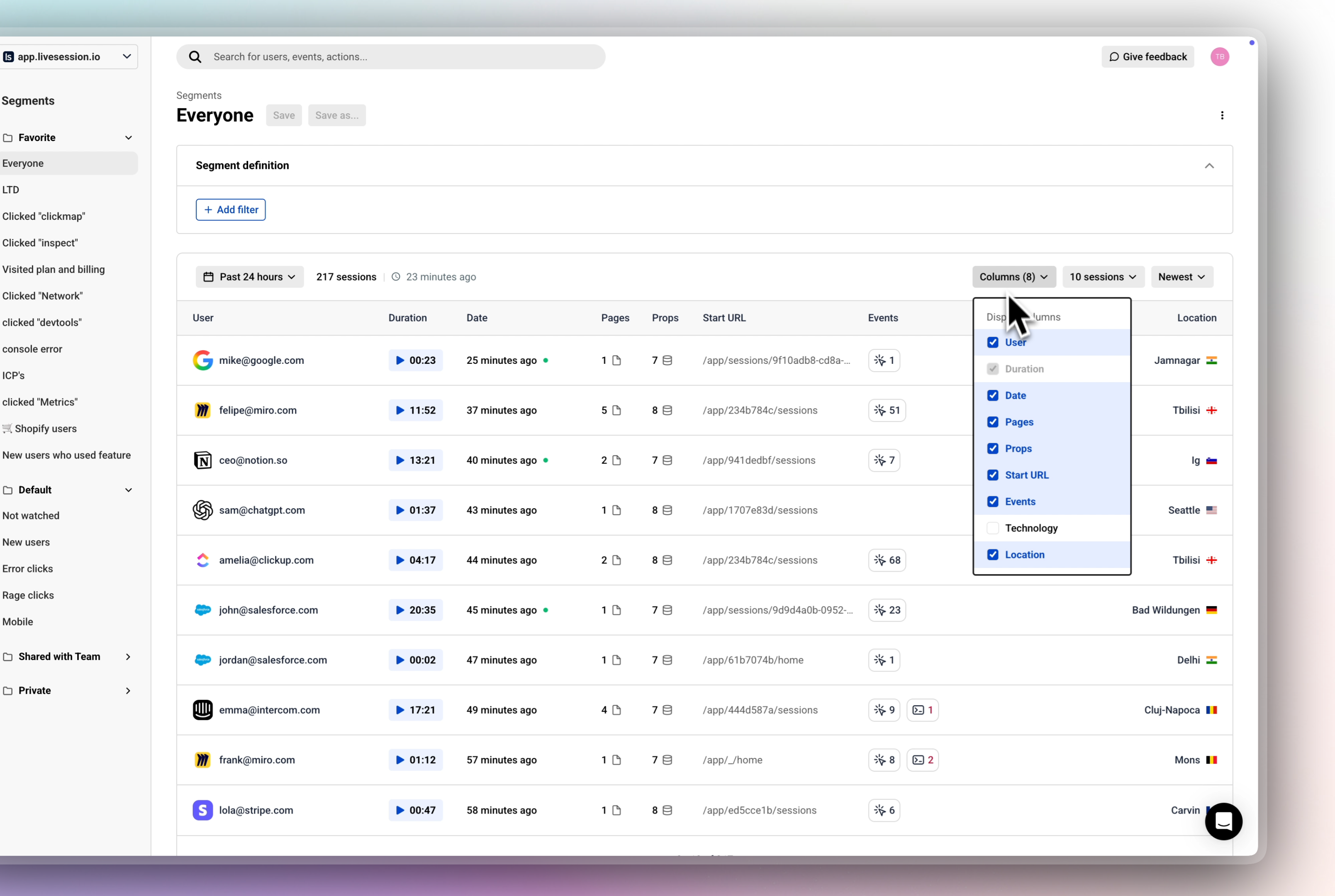
May 30th, 2025
Improvement

Hey there, LiveSession users! We’re pumped to share our latest update, packed with features that give you more control, flexibility, and a polished experience. Here’s what’s new:
Get ready to tailor your session list! With our redesigned table view, you can now choose exactly which columns to display, including:
👨🏼💻 User: Identify who’s interacting with your product.
⏰ Duration: See how long sessions last, with a sleek new Watch Session button to jump straight into Session Replays.
📅 Date: Track when sessions happened.
📄 Pages: Monitor page navigation patterns.
🔗 Props & Events: Dive deep into custom properties and events for web app projects.
➡️ Start URL: Focus on entry points for website projects.
💻 Technology: Understand the user's tech stack
📍 Location: Understand geographic context of your users.
Whether you’re analyzing a web app or a website, you can customize the table to show only what matters. Need props and events for your app? Swap in start URL for your website project. It’s all about your workflow.
Saved Preferences: Your column choices are saved per user, per project or website, so your perfect setup is ready every time you log in
Why You’ll Love It:
Less Clutter: Focus on the data you care about, without the noise.
More Personalization: Tailor the view to match your project’s goals.
Faster Analysis: Get to insights quicker with a streamlined, user-friendly table.

We’ve streamlined navigation with a shared header across Sessions, Dashboards, Metrics, and Funnels. This cohesive design keeps things intuitive and consistent, so you can move between sections without missing a beat.
Make the sidebar work for you! With our new configurable sidebar size, you can tweak it to fit your screen and style—go sleek and minimal or expand it for easier navigation. It’s all about creating a workspace that feels just right.
Our filter icons got a serious upgrade! Pulled straight from our design system, these new icons are crisp, consistent, and make filtering sessions feel seamless. Expect a cleaner, more intuitive experience every time you sort through your data.
We’re beyond excited to bring these updates to you, and we can’t wait to hear what you think! Jump in, explore the new features, and drop us your feedback to help us keep making LiveSession better every day.
Share your feedback here:
May 29th, 2025
Announcement

We've built something we should have had from day one: a transparent way for you to shape LiveSession's future.
Direct access: Click "Give Feedback" in your LiveSession app or visit our feedback portal directly.

What's different:
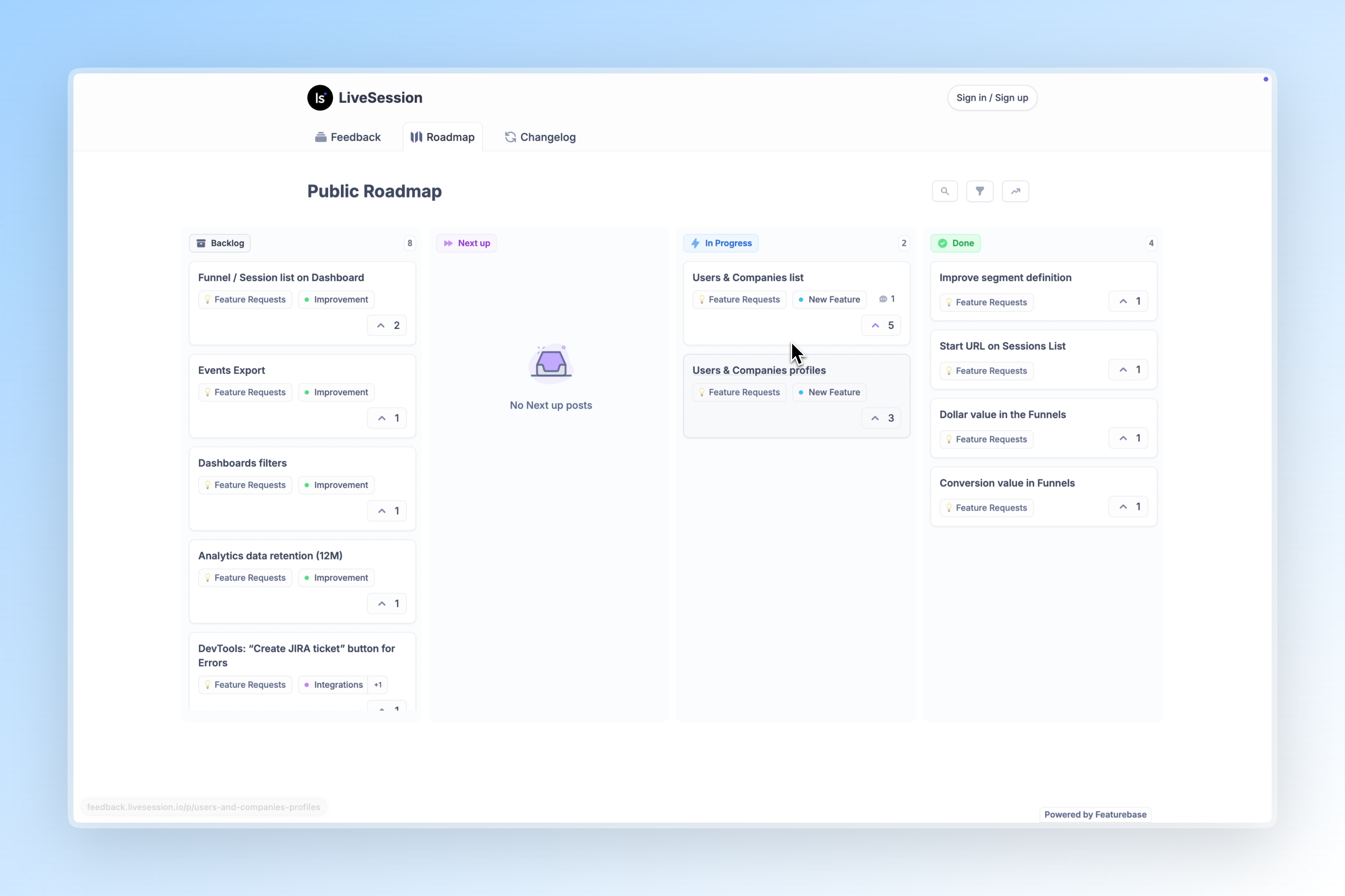
Public Roadmap - See exactly what we're building, what's in planning, and what's coming next. No more guessing about our priorities or timeline.
Community-Driven Requests - Browse feature requests from other users. Found something you need too? Upvote it. Your vote directly influences our development priorities.
Transparent Development - Submit new feature requests, comment on existing ones, and track progress from idea to implementation. Watch your suggestions move through our development process.
We've created a short video walkthrough showing you exactly how to:
📩 Submit a new feature request
🗺️ Explore our public roadmap
👍 Upvote and comment on existing requests
📈 Track the status of suggestions you care about
Watch the Tutorial Video 🔻
Access the portal: Click "Give Feedback" in your app or visit this page
Remember the configurable session table we just released? That came from consistent user feedback about needing project-specific data views. With our new portal, you would have been able to:
See this request building momentum through upvotes
Add your specific use case to the discussion
Track progress as we moved it from "Under Review" to "In Development" to "Released"
The features that matter most to your workflow should drive our roadmap. Whether it's a small interface improvement or a major new capability, your input shapes what we build next.
Start here:
Browse our public roadmap to see what's coming
Upvote requests that would help your work
Submit new ideas we haven't considered
Join discussions on features in development
Access the portal: Click "Give Feedback" in your app or visit this page
Questions about the portal? Comment below 👇
April 18th, 2025
New Feature

We're excited to bring you enhancements to our Funnels feature that give you deeper insights into your user journey and conversion metrics.
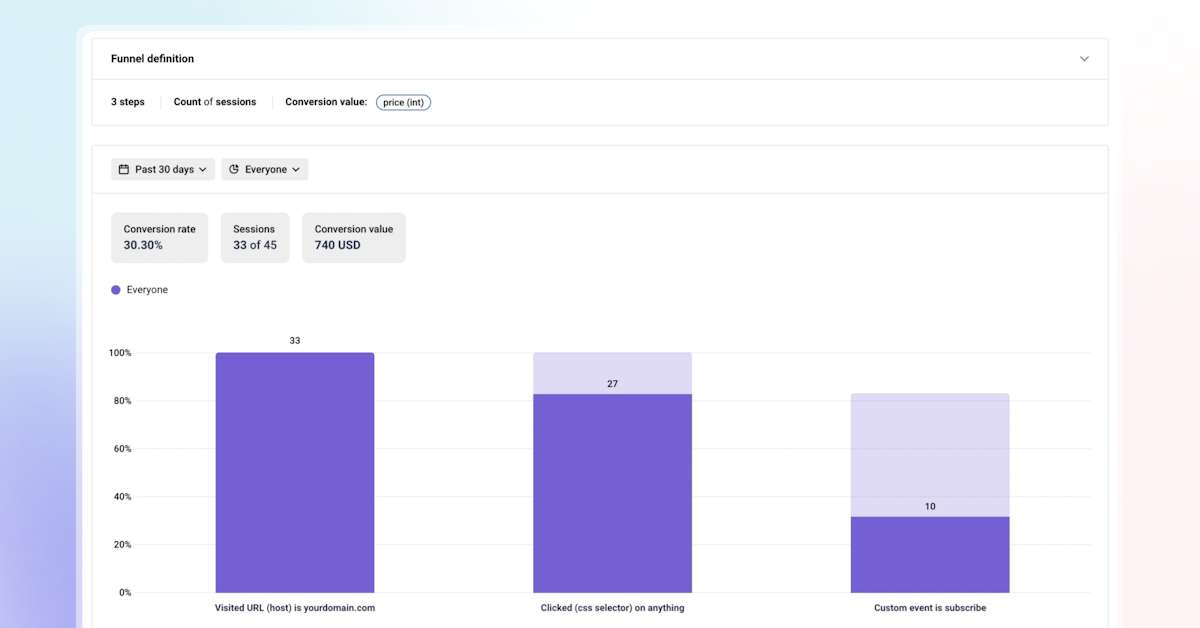
You can now see the overall conversion rate for your entire funnel directly in the display container, making it easier to quickly assess funnel performance.
Try This: Set up an onboarding funnel and see if you can spot any drop-off points in a single glance.
Want to know the actual dollar value of your funnel conversions? If your last funnel step has a number property (like order value or subscription price), you can now see the total revenue from things like new signups or completed purchases. It’s like putting a price tag on your funnel’s success!
Try This: Build an eCommerce checkout funnel and check out the total revenue from completed orders.
We’ve added some flexibility so you can track what matters most to you. Want to see how many individual users complete a step, like onboarding? Go with unique users. Or maybe you’re curious about repeat actions, like how often folks interact with your cart? Choose sessions instead. It’s all about getting the insights you need.
Try This: Test a SaaS activation funnel with unique users, then switch to sessions to see how many times the activation actions happened.
Which option’s your go-to? We’re curious to hear how you’re using this!
4. Filter Like a Pro
Our LiveSession filters are now part of Funnels, so you can zoom in on specific users or sessions by things like location, device, or behavior. Want to focus on users from a certain campaign? You’re in control, and it’s super easy to get those razor-sharp insights.
Try This: Filter your funnel to only include users from a recent marketing campaign and see how it’s performing.
Why These Changes Matter
These enhancements make it easier than ever to understand your users, optimize conversions, and drive revenue. Whether you’re a SaaS team aiming to increase trial-to-paid conversions or an eCommerce business streamlining checkout flows, our updated Funnels feature gives you the tools to succeed.
Log in to your LiveSession account to explore these new features, or check out our help center for setup guides and best practices. Not a user yet? Start a free trial to see how LiveSession can transform your analytics.
Have questions or feedback? Reach out to our team at support@livesession.io or book a personalized demo to see these features in action.
Happy analyzing,
The LiveSession Team
March 25th, 2025
Improvement

Every session’s unique, so we’re helping you spot the ones that matter most—fast 🏎️💨
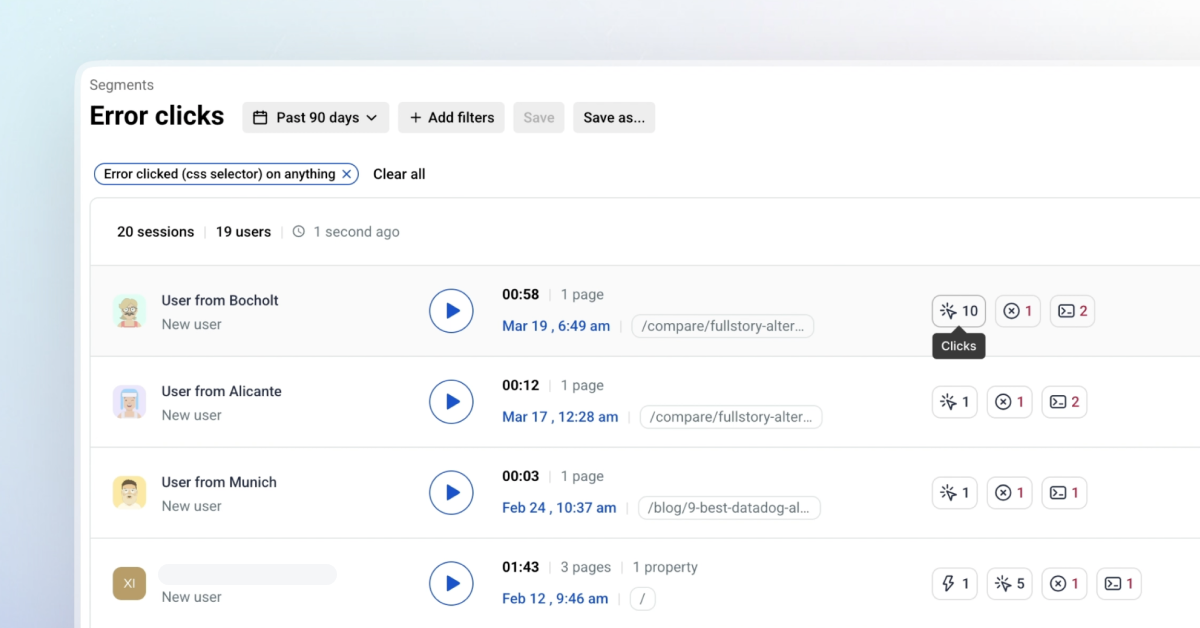
What’s New? Icons on the Sessions List for:
Custom Events: Catch key actions like sign-ups!
Error Clicks: Spot those issues before they escalate.
Error Logs: Troubleshoot like a pro.
Rage Clicks: Spot user frustration in a snap.
Click Count: Gauge engagement instantly.
+ Start URL information right in the Sessions list
Just dive in! How are these icons boosting your workflow? We can't wait for your feedback about the fresh look.
November 21st, 2024
New Feature
Improvement
Announcement

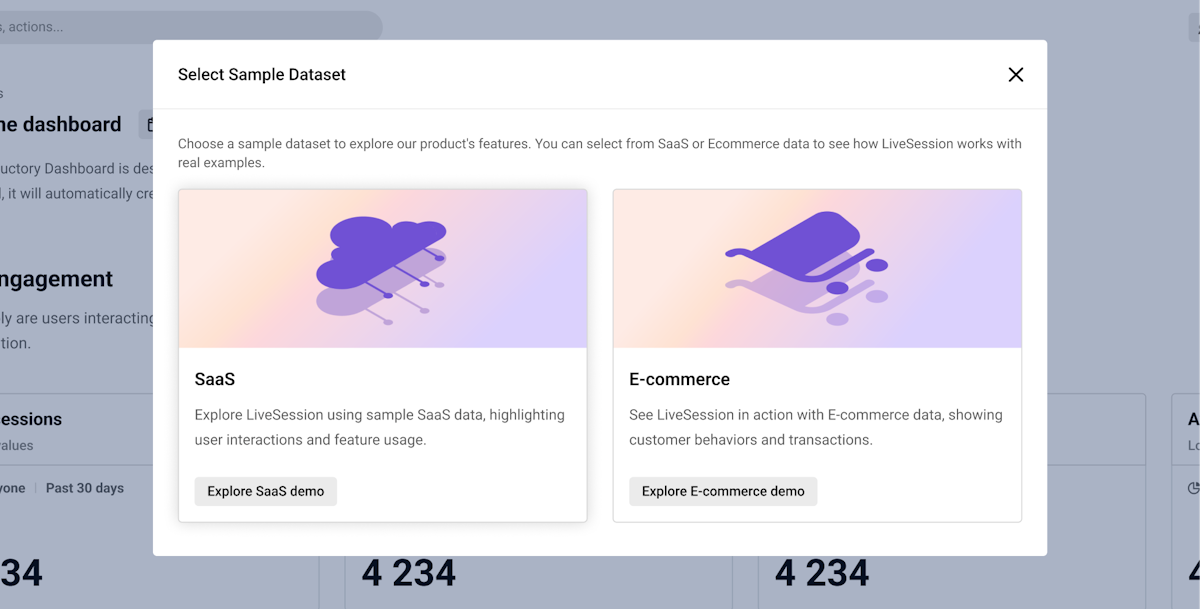
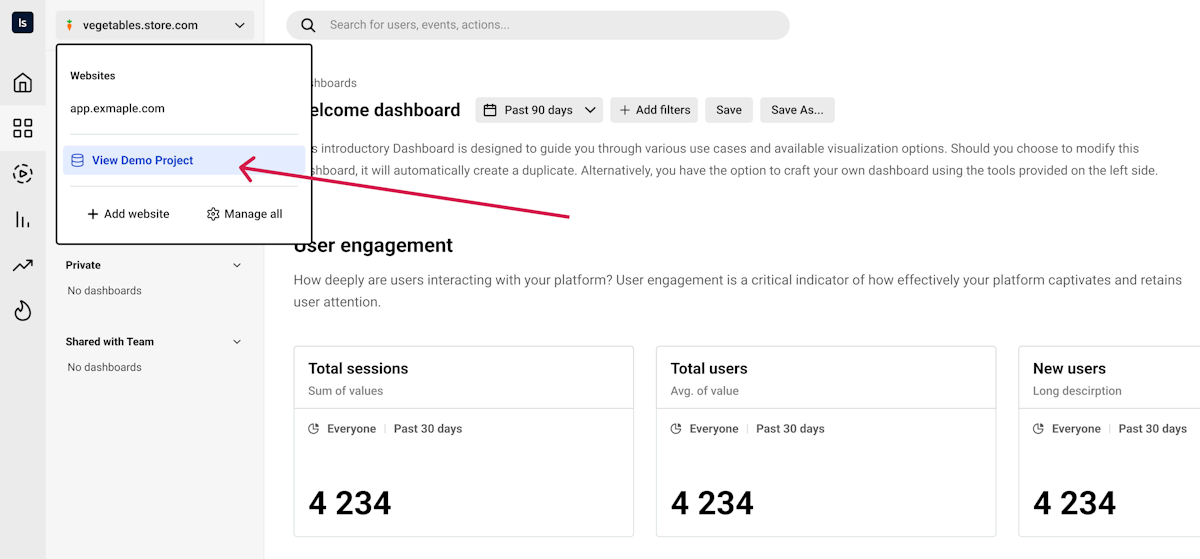
We’re excited to roll out a new way for you to explore and interact with LiveSession—the Demo Project! Whether you’re new to the platform or a seasoned pro, you can now access LiveSession with realistic sample data to dive into all our features.
🔍 How does it work?
You’ll find the "View demo project" button in three places:
In the websites/projects dropdown,
In your profile dropdown,
Or directly from the Home tab.

Once you click it, you can choose between SaaS or Ecommerce datasets (with more options coming soon!). Each dataset is fully equipped with everything you need to explore:
Dashboards
Metrics
Funnels
Segments
Custom events
Sessions
💡 Why should you try it?
Hands-on learning: Get a real feel for how LiveSession works without needing to set up tracking or use your own data.
Explore key features: Walk through dashboards, analyze metrics, and try out funnels—all on real-world data examples.
Experiment freely: Test out new ideas, practice segmenting data, and discover insights without impacting your own projects.
👥 Who is it for?
New users: Fast-track your learning and get to know the platform right away.
Existing users: Try advanced features with real scenarios to enhance your workflow.
Ready to dive in? Head to the dropdown and click "View demo project" to get started with SaaS or Ecommerce data now!
September 24th, 2024
Improvement

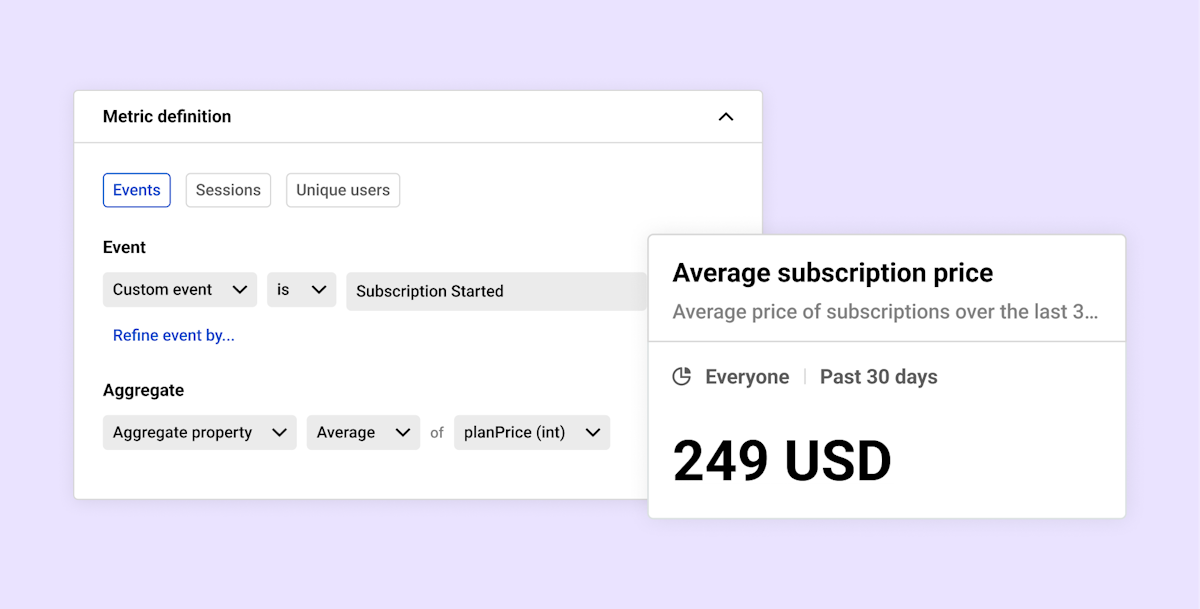
We're excited to introduce a powerful new feature in LiveSession – Event Properties Aggregation!
With this update, you can now perform sum, average, minimum, and maximum calculations on event properties directly within Metrics. This functionality gives you the ability to derive deeper insights from your custom events, such as:
Calculating the total revenue from subscriptions.
Finding the average subscription price.
Identifying the highest or lowest values for any tracked property.
This feature opens up new possibilities for data analysis, enabling you to easily track and measure key metrics relevant to your business.
Learn more here: https://help.livesession.io/en/articles/8795033-metrics
Give it a try and let us know what you think!
August 8th, 2024
Improvement

We're thrilled to introduce a new feature you've been asking for Refining events in LiveSession!
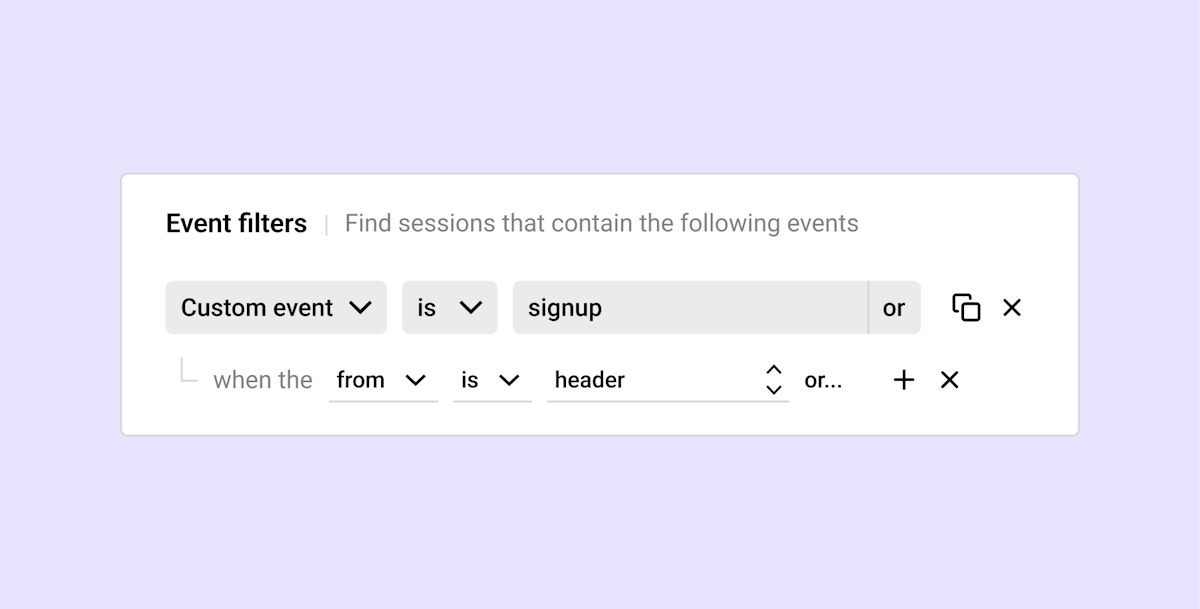
The "Refine Events" feature allows users to add event properties to their custom events for more detailed analysis and insights. By refining events with specific properties and values, users can filter sessions, create metrics, and add funnel steps that provide granular details about user interactions.
You can pass any properties you want. For e-commerce, this could include information about the value of the product added to the cart, the name of the product, or the quantity. For SaaS products, it could be the name of the plan, the currency, the number of users, and more. This flexibility allows you to capture a wide range of data points to enrich your event tracking and analysis.
Add Custom Events with properties: Enhance your custom events by adding specific properties and values. For instance, refine a "Signup" event with properties like "from" and values such as "Header," "Hero," or "Footer" to gain more context on user actions. See how to add Custom Events
Filter Sessions: Use refined custom events to filter sessions based on specific criteria. Analyze user behavior more precisely by focusing on refined properties.
Create Detailed Metrics: Develop metrics that provide insights into specific user interactions, like the conversion rate of users signing up from different sections of your site.
Add Funnel Steps: Incorporate refined events into your funnel analysis for a clearer understanding of user journeys and behaviors.
We're planning to extend the Refine Event feature to include properties for all events, not just custom events. Soon, you'll be able to refine standard events such as "Clicked" or "Visited URL" events.
The Refine Event feature currently works only for custom events with added custom properties, available in the Pro plan. See how to add Custom Events
Read more about the Refine Event feature: https://help.livesession.io/en/articles/9711497-refine-events
We believe this feature will become an essential part of your analytics toolkit, providing deeper insights and helping you make more informed decisions.
As always, we're eager to hear your feedback and see how you leverage the Refine Event feature to enhance your data-driven strategies.
July 18th, 2024
New Feature

Hey LiveSession users!
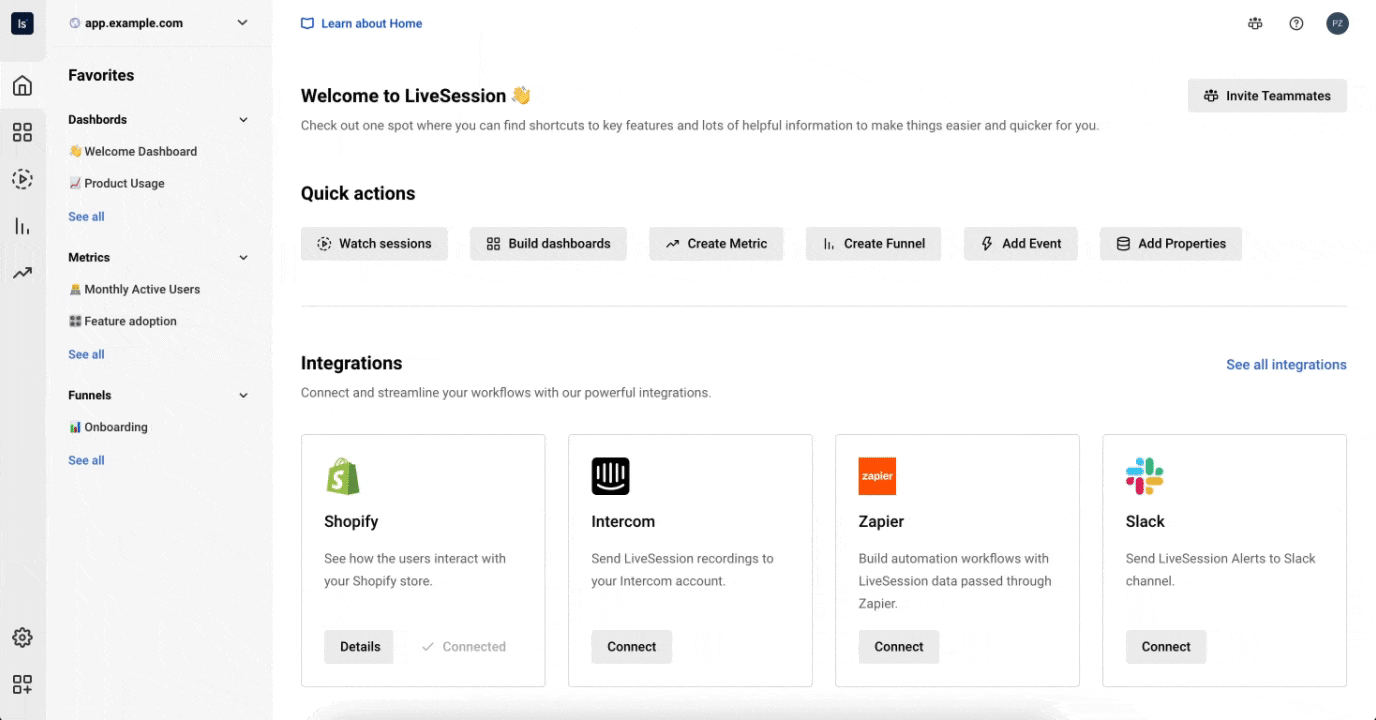
We’re thrilled to announce the launch of our brand new Home tab, designed to make your experience smoother and more efficient. Here’s a quick rundown of what the Home tab offers and how it can benefit you:
🔍 Quick Access to Features Find shortcuts to all the most frequently used features in LiveSession. Now, everything you need is just a click away, saving you time and effort.
💬 Provide Feedback Your thoughts matter! Use the Home tab to share your feedback and suggestions directly with us. This helps us understand your needs better and improve LiveSession for everyone.
🔗 Suggested Integrations Looking to enhance your workflow? The Home tab suggests useful integrations with other tools to help you get the most out of LiveSession.
📋 Comprehensive Feature List Discover the full range of LiveSession’s capabilities. The Home tab provides a complete list of features so you can explore everything we have to offer.
We’re committed to making the Home tab even better with your feedback. Let us know how we can improve it for you!
Happy browsing in your new Home tab! 🚀
Best,
The LiveSession Team
July 1st, 2024
New Feature
Improvement

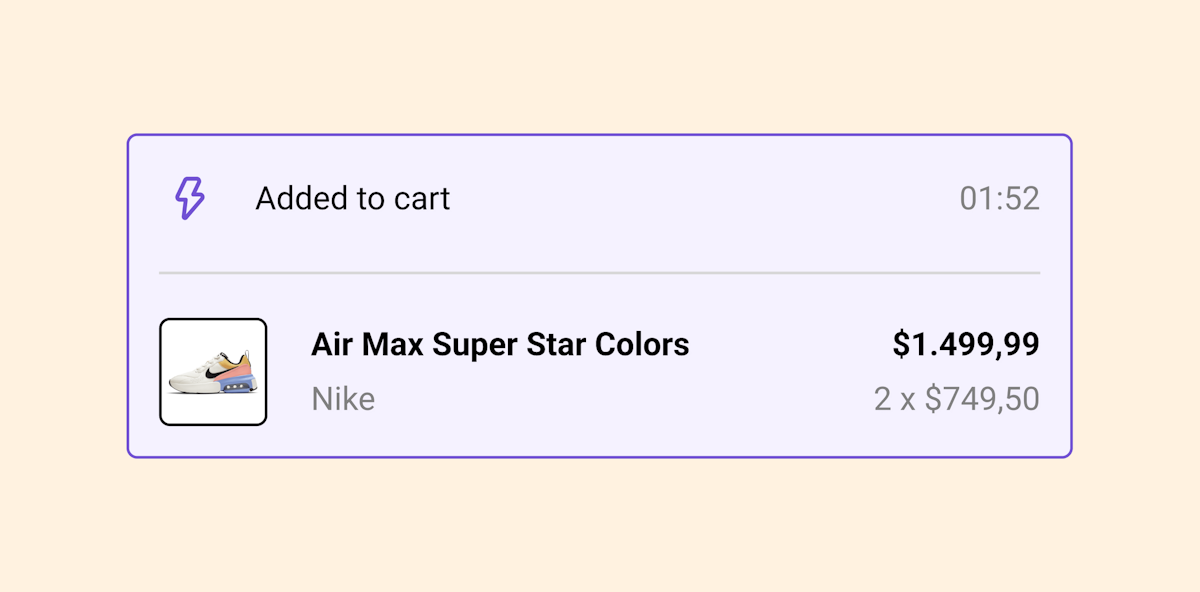
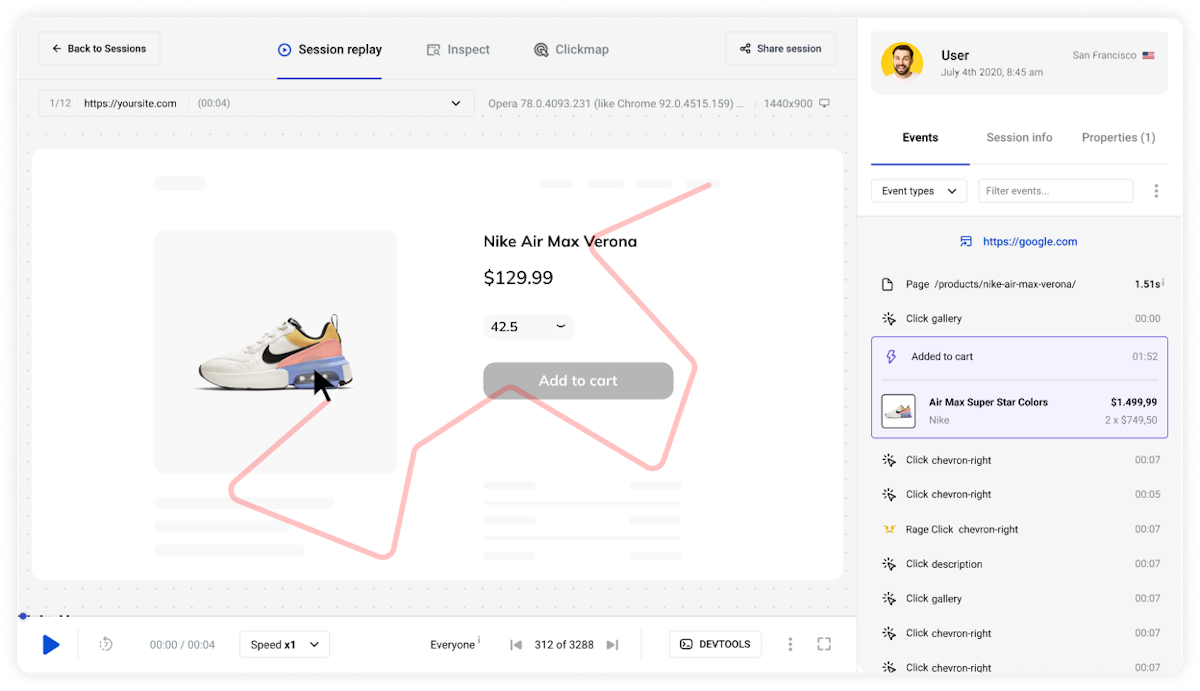
We are thrilled to announce a new upgrade for Shopify users on LiveSession! The event list in the session player will now include product photos, names, and prices for 'Added to Cart' events, providing a more detailed and comprehensive view. Additionally, this upgrade also applies to 'Product Viewed' events, where you can now see the photo and name of the product viewed by the user.
Product Photos: Easily see which products have been added to the cart or viewed by the user with clear, detailed images.
Product Names: Quickly identify the products added to the cart or viewed by their names.
Product Prices: View the total price and price per item for a more transparent shopping experience (for 'Added to Cart' events).
When a user adds a product to their cart or views a product, the event list in the session player will now display the product photo, name, and for 'Added to Cart' events, the price. This offers a more detailed overview of the cart's contents and the products viewed.